

Online Fax Service for Small to Mid-Size Organizations
An online fax service lets your small business send and receive faxes without a dedicated landline or a fax machine. With no machine to own, there are no repair or maintenance costs for aging equipment and no toner or fax paper to restock. If you need a paper copy of a fax, a standard printer does the job.
Fax.Live is cloud-based, so your fax account lives online instead of on a single machine in the office. Remote and hybrid employees can log in from any internet-connected device to send faxes or check the inbox, wherever they’re working.
Recommended reading: How to Set Up an Electronic Fax
Benefits of Fax.Live for SMBs
- Send faxes without a fax machine.
- Fax anywhere, from almost any connected device, at any time!
- Get your own dedicated fax number for sending and receiving faxes.
- Unlimited storage for your sent and received faxes.
- Simple to use interface.
- Affordable plans for small businesses.
- Free customizable cover pages for professional faxing.
How It Works: Online Faxing for Your Business
Fax.Live’s services work on both Windows and Mac, and almost any device with an internet connection. Your Fax.Live fax dashboard shows all fax activity, including sent and received faxes. Click and drag your PDF and get faxing today. No physical fax machine required. Here’s how it works:
- Set up an account.
- Upload the PDF you want to fax.
- Enter the recipient’s fax number.
- Select send!
- Find your fax number.
- Share your new fax number to receive faxes through Fax.Live!
FAQs About Online Fax Services for Small Businesses
Do I need a fax machine to use Fax.Live?
No fax machine is required to use Fax.Live. Almost any device (including Mac and Windows PC) with an internet connection will work with Fax.Live. Fax.Live’s web-based service handles everything. All you have to do is upload a PDF and we’ll send it to the fax number of your choice. You don’t need a fax machine to receive faxes, either. Incoming faxes arrive in your Fax.Live inbox!
Learn more about how faxing over the internet works.
Do I need to get a fax number to use Fax.Live?
No, you don’t need an existing fax number or phone line to use Fax.Live. When you set up your Fax.Live account, we’ll assign you a dedicated fax number that you can use to send and receive faxes. This fax number can be used like any other fax number. Give the number to any recipient, and they’ll be able to send faxes the same way they would to a traditional fax machine.
Read more about how to set up an electronic fax.
Can I fax from my phone?
Yes. Open Fax.Live in your phone’s web browser and log in to your account. From there, you can send and receive faxes the same way you would on a computer, with no app to download. Before you send, make sure the PDF you want to fax is saved on your phone or in cloud storage you can reach from it. Faxing over cellular data may count toward your data plan, so connect to Wi-Fi if data charges are a concern.
See how faxing from your phone works.
Do I get cloud storage with my Fax.Live account?
Yes, all faxes you send and receive through Fax.Live are stored in your account dashboard, as long as your account is current. Your faxes remain there until you remove them. You’ll see your fax history in your Fax Activity section of the dashboard. When you receive a fax, you can download, print, sign, edit, or delete the fax.
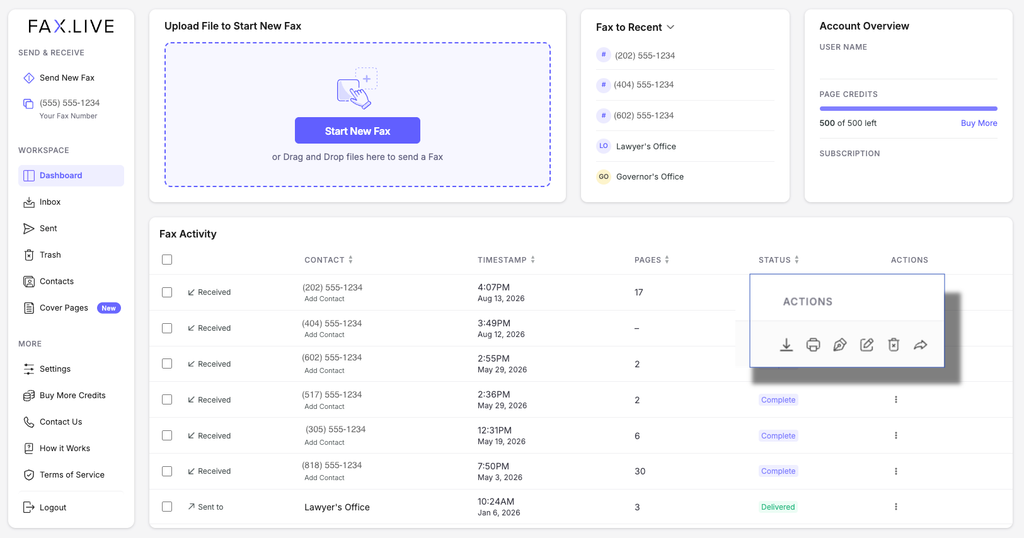
See how Fax.Live’s unlimited storage works.
What is the best online fax service for small businesses?
We hope you find that Fax.Live offers the best efax (electronic fax) service for small businesses. Its simple interface and affordable plans make it a practical fit for small teams. Fax.Live is easy to set up and works well for small, medium and larger organizations. Fax.Live saves you the expense of a dedicated fax phone line and helps you avoid setup and maintenance costs associated with a fax machine.
Discover how Fax.Live lets you fax without a fax machine. Send a free fax today to try out Fax.Live!