

Faxing, just like emailing and talking on the phone, has a set of unspoken rules for how to communicate. Some fax etiquette is simple politeness, while others are for your safety and privacy. Whether you’ve never faxed before or haven’t faxed in a while, fax etiquette works a bit differently from other ways of communicating — like emailing or mailing a letter.
As a brief overview, a fax is a facsimile of a document that you transmit to someone over the phone (or internet with Fax over Internet Protocol, or FoIP). Many of our do’s and don’ts for faxing are centered around making faxing smoother for both senders and recipients. Let’s check them out.
Fax Do’s — Common Fax Etiquette
Use a fax cover sheet
A fax cover sheet is an extra page inserted in front of the document you’re faxing, with information about who you are and who you’re sending the fax to. It’s technically optional, but good etiquette to include it, as it helps the recipient route your fax to the right person or department and know why you’re sending it.
It’s also a nice privacy measure. Someone who glances at your fax after it’s been printed won’t be able to see sensitive information at first glance. They can see who the fax is meant for without having to search the document. You can add a free fax cover sheet to your faxed document here.
Call ahead about your fax
If you’re planning to fax an important legal or medical document, consider calling ahead to ensure the institution you’re faxing to knows the document is coming. Not only does this remind them that you’re about to send something, but it also serves as a way to verify you’re sending it to the right place. Speaking of which…
Verify the fax number
Double-check a fax number is correct before you fax, and ensure you’re sending to a connected and working fax machine. Not every phone line is connected to a fax machine — some recipients share one line between phone and fax, so a number that rings through doesn’t guarantee a fax machine picks up. You might even consider sending a test fax.
Follow up on your fax
Fax.Live provides email confirmations for your faxes, but that’s only a confirmation that your fax was successfully transmitted, not that it was received by a real person. If you’re faxing time-sensitive documents or information, immediately let your recipient know via phone or email that you sent the fax.
Fax as few pages as possible
Faxing large documents with lots of pages or heavy graphics takes longer than a single page of text. A larger faxed file can increase the likelihood of a connection interruption or a failed fax. Faxing large documents also takes up resources on the recipient’s side (ink and paper), so it’s good etiquette to fax as few pages as possible and keep your documents concise. For example, if you’re signing a contract, you may need only to fax the signature page, not the entire contract. (We are not legal experts, however! Check with a legal expert.)
Use legible fonts and adequate margins
If you’re creating a document to fax, make sure you’re using a legible font. This is especially important if you’re scanning the document for faxing, as scan quality can vary from machine to machine. Double-check any scans or PDF versions of documents before faxing to make sure the text is legible. When in doubt, use a common 12-point size and font such as Times New Roman or Arial.
Margins are also commonly a problem with scanned or printed documents, as the sides can get cut off on older fax machines. Set all margins to 1 inch on all sides to stay safe.
Check for fax confirmation
If you’re using a digital fax service like Fax.Live, you’ll receive a fax confirmation email when your fax is successfully transmitted. You can also check the Fax.Live dashboard to see the status of all sent and received faxes.
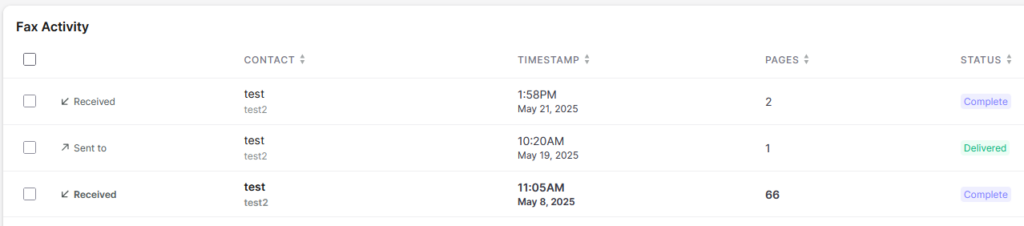
Always check to make sure your fax went through, especially if it contains sensitive information.
Fax Don’ts
Don’t fax sensitive information without authorization
Sensitive documents, like healthcare or legal, shouldn’t be transmitted unless you’re using a reputable platform and have authorization from the recipient to send them a fax. You should know exactly what number to send your information to, not a general fax number from their office. Don’t send a fax with private information unless you’re sure of the recipient.
Don’t use dark backgrounds or color-heavy content
Did you know faxing is almost always black and white? Faxing in color requires a very specific, rare setup. Therefore, it’s almost always bad etiquette to transmit faxes with dark backgrounds or color-heavy content like pictures. Dark backgrounds will make your document text illegible when it’s converted to black and white. Color-heavy content not only will be illegible, but also will take a very long time to fax, as images have a lot more data to transmit than text. And, when your recipient prints your fax, the image-heavy files will use more of their ink.
Don’t send long documents (without letting the recipient know first)
If you absolutely have to fax a large document like a manuscript or e-book, let your recipient know before sending. This “don’t” mainly applies if they’re using a physical fax machine, because many are set up to automatically print everything they receive, which means a long document results in a lot of wasted ink and paper. It’s good etiquette to give them a heads-up so they can prepare for it, or even print selectively. If your recipient is open to it, suggest they try Fax.Live for free instead. Since faxes arrive digitally, they can review documents on-screen without printing a thing — no wasted paper, no matter how long the fax is.
Don’t interrupt the fax
If you’re using a digital fax service, you may need to keep your web browser open while a fax is transmitted to your recipient. If you close out of the webpage or disconnect from the internet while faxing, the document may not send properly. From a desktop or laptop, this isn’t much of a problem, but if you’re faxing from your phone, we don’t recommend transmitting over your data network. Wait until you’re connected to Wi-Fi.